








AI Thinking Mode Explained: When to Use Reasoning Models in Communications
This article explains what AI reasoning modes actually do, when communications and marketing teams should use them, and how to recognise when the wrong model is costing you time and quality.

AI Generated Summary:
AUDIO FILE DOWNLOAD- What “Thinking” Mode Actually Is: Reasoning models work through a problem in steps and check themselves before answering, and most platforms now let you control how much of that they do.
- Where It Earns Its Keep: Strategy, crisis response, analysis, structured reporting, and anything where a wrong answer becomes public.
- Where It Doesn’t: Quick posts, recaps, triage and brainstorming, where a fast tier is cheaper and just as good.
- The Wrong-Model Problem: Five common mismatches, from using the fast default for crisis work to pasting a long report in pieces, and what to use instead.
We’ve all been there. You open ChatGPT, Claude, Copilot or Gemini and ask., “What’s the best way to improve my campaign?” Within seconds you get a confident list of suggestions. The answer sounds right, but you’re not sure how it got there, so you roll with it because it’s fast and convenient.
That’s because the options in that drop-down don’t all think the same way. Fast models work like a GPS. They get you somewhere useful quickly, but they rarely explain why one route was chosen over another. Reasoning models behave more like strategists. They break problems into steps, weigh different paths, use tools and data, and check their own work before answering. That means clearer, more structured outputs that line up with your input.
The label that confuses most people is the one that says “Thinking.” Is it worth switching on? Does it use more credits? It depends on the task, and many teams use it, or skip it, in the wrong places. Every major provider now has a family of tiers, and many let you set how much effort the model spends. Matching the tier and the effort to the task is what separates a vague, generic strategy proposal from a useful one.
Why "Think Step by Step" Matters Less Than It Used To
Chain-of-thought (CoT) started as a prompting technique. Early AI users discovered that explicitly asking models to reason through a problem often improved results. Users told the AI to “think step by step” to improve results on complex, multi-step tasks. If you asked a fast model, “What’s the right positioning for our Q4 sustainability campaign?” and added “Think step by step,” it might produce a breakdown like:
- Reviewing previous campaign performance
- Analysing audience sentiment around sustainability
- Checking brand messaging alignment
- Drafting positioning angles
That improved the output, but the model was still generating those steps by predicting what comes next. It wasn’t verifying that each step mattered for your audience or goals, so the result could still feel generic or miss key context.
Today’s reasoning models do that work internally, so the control has moved from your wording to a setting. OpenAI retired ChatGPT’s old Instant/Thinking/Pro mode picker on August 6, replacing it with a thinking-effort control that runs from Instant through Medium, High and Extra High, all on GPT-6 Sol, with a separate Pro option powered by Astra.

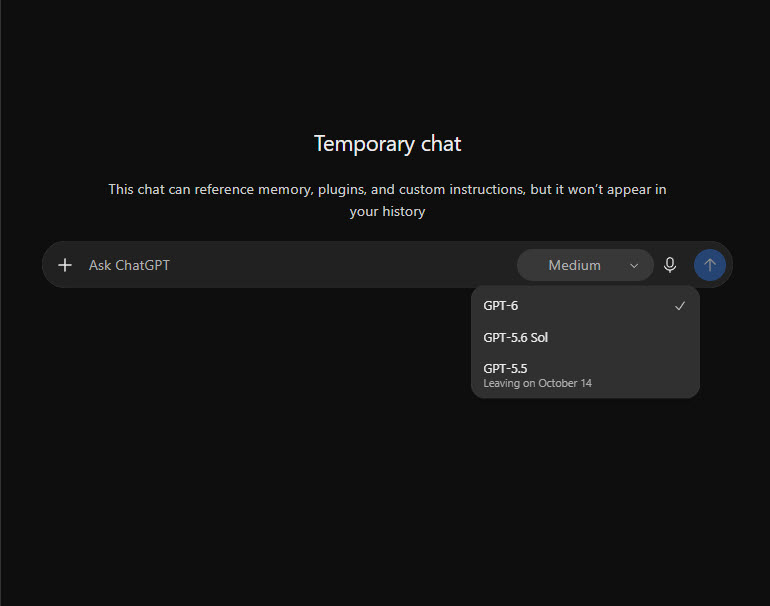
Anthropic’s new Haiku 5.5 is the first Haiku with an adjustable effort setting, offering five levels with Medium as the default. Prompting guidance for 2026 reflects the shift: depth of reasoning has become a dial rather than a sentence, with effort settings and context structure as the main levers, and OpenAI’s own guidance discourages “think step by step” prompts on reasoning models.

The practical upshot is that you can buy thinking by the task. The same model can handle a caption at low effort and a product-recall response plan at high effort.
When Should You Use Reasoning Models?
You don’t need deep reasoning for every task. Using it for simple outputs is overkill, and planning how to write a social caption doesn’t need that level of analysis. Reasoning pays off when a task needs structured thinking, multi-step logic and clear justification, particularly when you’re making decisions, analysing complex data or communicating layered insights to stakeholders.
Use Reasoning Models For:
Strategic & Scenario Planning
When you’re evaluating campaign options, channel strategies or crisis responses, reasoning models can map risks, simulate outcomes and help you choose a path before launch.
- Example: Predicting how a brand statement, influencer collaboration or social listening approach might affect audience sentiment during a product recall, using Claude Fable 5.1 or GPT-6 Astra.
Analytics, Data Interpretation & Performance Insights
All models can find patterns in data, but reasoning models connect more data points at once and explain why.
- Example: Using Gemini 3.1 Pro to analyse a drop in engagement by linking it to audience shifts, channel changes or message timing.
Data-Driven Reports & Technical Content
For post-campaign reports, RFPs or executive decks, reasoning models help structure complex content into clear, actionable insight.
- Example: Building a multi-phase go-to-market strategy, with a justification for each recommendation, using Claude Opus 5.5 or GPT-6 Sol at a higher effort setting.
Problem-Solving & Market Analysis
Reasoning models can turn research, audience insight and competitor analysis into prioritised action plans.
- Example: Synthesising competitive positioning to refine your messaging, using open-weight options such as Kimi K3 or Qwen3.8-Max when cost or vendor flexibility matters.
Anything Where a Wrong Answer Is Public
Statements, quotes, claims and anything going to a journalist or a board belong here. Models differ in how they fail, and independent testing of Gemini 4 Argon, for example, found a 15% hallucination rate on AA-Omniscience, which measures wrong answers against honest “I don’t know” responses. Argon isn’t generally available yet, since access is being staged, but it shows why accuracy should be part of model selection. Whichever model you use, ask it to separate what comes from your sources from what it’s inferring.
- Example: Drafting a holding statement with Claude Fable 5.1 or GPT-6 Astra, then asking the model to flag any claim the approved facts don’t support.
When to Skip Reasoning Models
For quick, low-complexity work, a deep model is like overthinking the problem. Use a fast tier, or turn the effort dial down, with options such as:
- Claude Haiku 5.5
- OpenAI’s GPT-6 Luna, or ChatGPT’s Instant setting
- Google’s Gemini 3.8 Flash
- DeepSeek V4.1 Flash
Good use cases for fast tiers in marketing and comms:
- Quick social posts or headlines where tone and creativity matter more than analysis.
- Summaries and meeting recaps where speed and clarity are the priority.
- Triaging a pile of mentions, reviews or inbound requests before a person looks at the important ones.
- Brainstorming taglines or high-volume ideation where you want many options quickly.
- Routine drafts where step-by-step analysis would slow delivery without adding value.
For everything else, where you need clear structure and deeper insight, use a reasoning tier (see the table below).
Five Signs You’re Using the Wrong Model for the Task
Most teams don’t pick the wrong model on purpose. They leave the default on, or they use one setting for everything. These are the five mismatches that show up most.
- The answers are safe, generic and one-sided.
You asked for strategy or scenario planning and got one plausible answer dressed up as options. That’s a fast tier on a reasoning task. Switch to a reasoning tier or raise the effort setting, and ask for three distinct options with the trade-offs of each.
Example: A positioning brief that lists the same three themes any competitor would. Rerun it on Claude Opus 5.5 or GPT-6 Sol at High effort, and ask which option you’d regret least. - Simple jobs are slow.
You’re running captions, recaps or tagging on the deepest model or the highest effort. Drop to a fast tier such as Claude Haiku 5.5, GPT-6 Luna or Gemini 3.8 Flash.
Example: 40 caption variants for one campaign. A fast tier finishes in seconds at a fraction of the cost. - A confident statement contains claims nobody can source.
High-stakes writing needs more than a better model. It needs a check. Use a deeper tier, give it only approved facts, and ask it to flag any claim those facts don’t support.
Example: A holding statement drafted on the default setting that cites a figure nobody supplied. Rerun it with the approved facts attached and the instruction “Separate what comes from these facts from anything you’re inferring.” - You’re feeding a long document in pieces.
If you paste a report across three prompts and stitch the answers together, you’ve hit a context limit. Use a model with a large context window and give it the whole document at once. Claude Sonnet 5.5 and Gemini 3.1 Pro both are known for having larger context windows.
Example: A quarter of coverage reports, survey results and last quarter’s deck, synthesised in one pass instead of three. - One model is doing two jobs.
Asking a model to both find current information and judge it often goes wrong, because a model without live data may lean on out-of-date training knowledge. Use a search-grounded tool such as Perplexity, or a live-data model such as Grok for X, to gather, then hand the material to a reasoning model to interpret.
Example: Pull a competitor’s last six announcements with sources, then ask a reasoning model what the shift in positioning implies.
Matching the Model to the Task
Start with the task, then pick the tier.
How to Prompt Reasoning Models
Prompting a reasoning model well gets you structured, actionable output aligned with your goals. These models reason internally, but the quality of what you get still depends on how you frame the request.
- Lead with the outcome and the context: Explain what you need, why, who it’s for and what a finished answer looks like. Newer guidance favors shorter, outcome-oriented prompts over rigid step-by-step instructions.
- Specify the output format: Whether you need a plan, a summary with recommendations or a framework, say so, so the result is usable straight away.
- Skip “think step by step”: Reasoning models already plan their answers. Raise the effort setting if the thinking looks shallow instead.
- Provide all relevant information in one prompt whenever possible: Reasoning models perform best when they can evaluate the entire problem rather than reconstruct context across multiple exchanges.
- Try zero examples first, then add a few for format: Two to four examples help with classification and extraction, but open-ended writing needs fewer so the example’s tone doesn’t leak in.
- Use roles for tone, not capability: A role still sets audience and voice, but “world-class expert” priming no longer improves reasoning.
- Finish with an audit question: Ask, “What assumptions did you make, and where is this most likely to be wrong?” Confident, well-structured answers can hide errors.
For example, instead of asking, “Explain step by step how to improve my campaign,” try Role, Task, Context prompting:
“As a marketing strategist (Role), review our Q3 campaign results and develop an actionable plan to improve performance next quarter (Task), structured for stakeholder presentation (Format). Flag any recommendation the data doesn’t support.”
Or:
“As a brand strategist (Role), using the brand guidelines and past campaign data provided (Context), create a positioning framework with three options and the pros and cons of each (Task), formatted for a stakeholder presentation (Format).”
An additional prompt to include help to audit the response:
What assumptions did you make, and where is this most likely to be wrong?
This single question often reveals unsupported claims, weak reasoning and missing context before content reaches stakeholders.
Conclusion
Reasoning mode isn’t something to switch on for everything or to avoid altogether. It’s a tool for the tasks where depth changes the answer. Before you pick a model or a thinking level, ask what happens if the output is wrong. If the answer is “not much,” go fast and cheap. If it’s “it becomes public,” go deep and keep a person in the loop. That one question catches most wrong-model mistakes.
Need help selecting the right AI tools, governance approach or workflow for your communications team? Get in touch to discuss model selection, implementation and training.
Frequently Asked Questions
What is AI Thinking Mode?
AI Thinking Mode is a reasoning capability that allows an AI model to spend more time analysing a problem before generating a response. Rather than producing an immediate answer, the model evaluates options, checks assumptions and works through complex decisions before responding.
What is the difference between reasoning models and fast models?
Reasoning models prioritise accuracy, analysis and problem solving, while fast models prioritise speed and efficiency. Fast models are typically better for drafting content, brainstorming ideas and handling routine tasks. I.e. less overthinking! Reasoning models are better for strategic decisions, research, planning and high-stakes communications.
Are reasoning models more accurate than fast models?
Often, yes. Reasoning models are designed to allocate additional computational effort to analysing information and evaluating potential answers. However, they can still make mistakes and should not replace human judgment, particularly for business, legal or regulatory decisions.
Reasoning models may reduce certain types of hallucinations because they spend more time evaluating information before responding. However, hallucinations can still occur, especially when the model lacks relevant data or is asked to make assumptions.
Which is better: reasoning models or fast models?
Neither is universally better. Fast models are generally better for speed, content generation and everyday tasks. One of the models we've used that is considered to be a 'fast model' has performed well in the more complex tasks of analysis. *DeepSeek-V4.1-Flash is primarily a fast model optimised for speed, efficiency and high-throughput workloads. However, unlike many traditional fast models, it includes configurable reasoning effort, allowing users to trade speed for deeper analysis on more complex tasks.
Reasoning models are generally better for analysis, planning, decision-making and complex problem solving. The best choice depends on the importance, complexity and risk associated with the task.
